1 fpsから25 fpsまでの調整From 1 fps to 25 fps
動きの把握が重要な場所では25 fps、変化が少ない監視には低いフレームレート。撮影密度と保存量を用途に合わせて決められます。Choose 25 fps where motion matters, or lower rates for slowly changing scenes. Match temporal detail to retention needs.

SunCurve — 防犯カメラの、その先へ。AIで、暮らしとビジネスに新しい可能性を。SunCurve — Beyond security cameras. Opening new possibilities for everyday life and business with AI.
IMOU / DAHUA TECHNOLOGY · G30P
G30Pは、映像だけでなく音声も扱えるネットワークカメラ。フレームレート、二系統の配信、圧縮と帯域、画質プロファイル、イベント連動まで、用途に応じて運用を組み立てられます。G30P is a network camera that handles both video and audio. Tune frame rate, dual streams, compression, bandwidth, image profiles and event linkage to the needs of each installation.
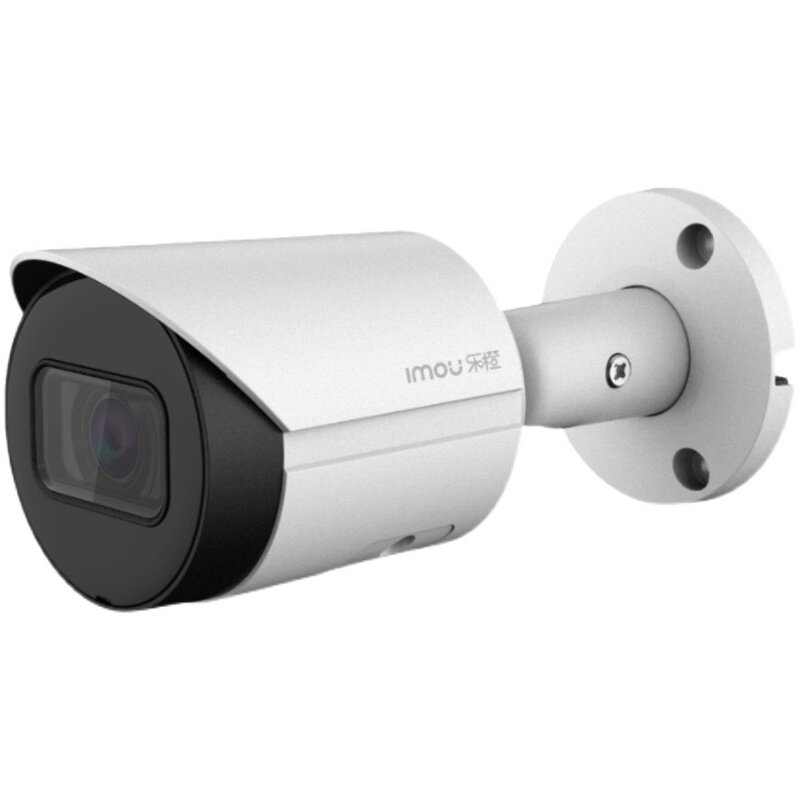 製品外観Product exterior
01 / Technical profile
映像、音声、配信、検知の設定項目を詳しく紹介します。Explore video, audio, streaming and detection controls in detail.
| モデルModel | DAHUA IMOU G30P |
|---|---|
| 最大映像設定Maximum video setting | 1920 × 1080 (1080P) |
| メインストリームMain stream | フレームレートを1 fpsから個別選択、25 fps設定を実機画面で確認Frame-rate choices start at 1 fps; the device screen shows a 25 fps setting |
| サブストリームSub stream | 独立した設定画面。D1解像度、1 fpsと25 fpsの選択例を確認Independently configurable; D1 resolution with observed 1 fps and 25 fps choices |
| 映像符号化Video encoding | H.265、通常/Smart Codec設定H.265; Regular and Smart Codec strategies |
| 帯域制御Bitrate control | メインストリームの表示選択肢は512–4096 Kb/s。サブストリームはCBR・512 Kb/s設定例Displayed main-stream choices span 512–4096 Kb/s; sub-stream example uses CBR at 512 Kb/s |
| 音声Audio | 音声を含む記録・配信設定に対応Audio-capable recording and streaming controls G.711A / 8 kHz の設定表示shown in configuration |
| 画質調整Image tuning | Day/Night/Normalプロファイル、明るさ・コントラスト・ガンマ・彩度、色調Day/Night/Normal profiles; brightness, contrast, gamma, saturation and color mode |
| 静止画・関心領域Snapshots and ROI | 通常/イベント連動スナップショット、感兴趣区域の範囲と画質レベル設定Regular or triggered snapshots; configurable region of interest and quality level |
| イベント解析Event analytics | ライン横断、エリア侵入、録画・スナップショット・メール連動の設定画面Line crossing and region intrusion with recording, snapshot and email linkage controls |
| 障害監視Health events | SD、ネットワーク、アクセス、電圧、セキュリティ異常の設定タブConfiguration tabs for SD, network, access, voltage and security exceptions |
| ONVIF | 実機のシステム情報にONVIFバージョン表示An ONVIF version is shown in the device's system information |
ConfigToolでは音声の有効化、G.711A、8 kHzが表示されます。映像と音の両方を扱えることは、店舗の応対や現場の状況把握に意味を持ちます。録音運用では設置場所の告知と適用法令への配慮が必要です。ConfigTool displays audio enablement, G.711A and 8 kHz. Combined video and sound can aid store operations and incident context. Audio use should follow local notice and legal requirements.
メインは記録品質、サブは遠隔確認や回線負荷を重視。各ストリームで解像度、フレームレート、帯域を分けられる構成です。Use the main stream for recording detail and the sub stream for lighter remote viewing, with separate resolution, frame-rate and bitrate choices.
関西の屋内で蛍光灯・省エネ照明による横縞やちらつきが出る場合は、防ちらつき設定がある機種では60 Hzに設定し、映像を確認してください。屋外の自然光下では通常、この照明由来の現象は起こりません。防ちらつきとPAL/NTSCの映像方式は別の設定です。If fluorescent or energy-saving lighting causes bands or flicker indoors in Kansai, set Anti-flicker to 60 Hz where available and check the image. This lighting-related effect normally does not occur outdoors in natural daylight. Anti-flicker is separate from the PAL/NTSC video standard.
02 / Operational design
同じ場所でも、証跡を厚く残したい時間帯と、通信量を抑えて広く監視したい時間帯では設計が変わります。A site may need detailed evidence in one period and efficient, wide-area monitoring in another. G30P exposes controls for that trade-off.
動きの把握が重要な場所では25 fps、変化が少ない監視には低いフレームレート。撮影密度と保存量を用途に合わせて決められます。Choose 25 fps where motion matters, or lower rates for slowly changing scenes. Match temporal detail to retention needs.
符号化方式と戦略を分けて設定。画質、帯域、録画日数のバランスをNVR・ネットワーク環境に合わせて詰められます。Set compression and strategy separately, balancing image detail, bandwidth and retention against the NVR and network.
記録には1920×1080、遠隔プレビューには軽量なD1など、同一カメラを二つの消費経路へ最適化できます。Record at 1920×1080 while serving a lighter D1 preview to constrained clients from the same camera.
音声項目とG.711A設定が実機で表示。映像だけでは分かりにくい応対や作業の前後関係を、音声と一緒に把握できます。The device shows audio and G.711A settings, helping operators understand conversations and activity around the visual record.
Day/Night/Normal、Standard/Bright/Softなどのプロファイルと画質スライダーを組み合わせ、逆光や照度の違いへ細かく対応。Combine Day/Night/Normal and Standard/Bright/Soft profiles with image sliders to adapt to changing illumination.
ライン横断・エリア侵入のルール、検知方向や対象サイズ、録画・スナップショット・メールを組み合わせられます。Combine line-crossing and intrusion rules, direction and size filters with recording, snapshots and email actions.
03 / SETTINGS WALKTHROUGH
各画面の調整項目と、設置現場での使い方を紹介します。Each screen explains its controls and how they support site operation.
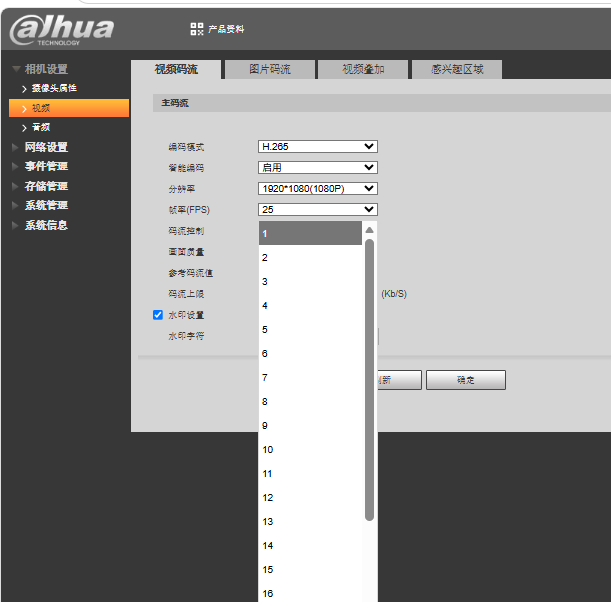
メインストリームに1920×1080、H.265、25 fpsを表示。ドロップダウンは1 fpsから一段ずつ選べる構成で、動きと容量の配分を現場ごとに決められます。The main stream shows 1920×1080, H.265 and 25 fps. The dropdown begins at 1 fps with individual steps, enabling site-specific motion/retention choices.
FRAME-RATE CONTROL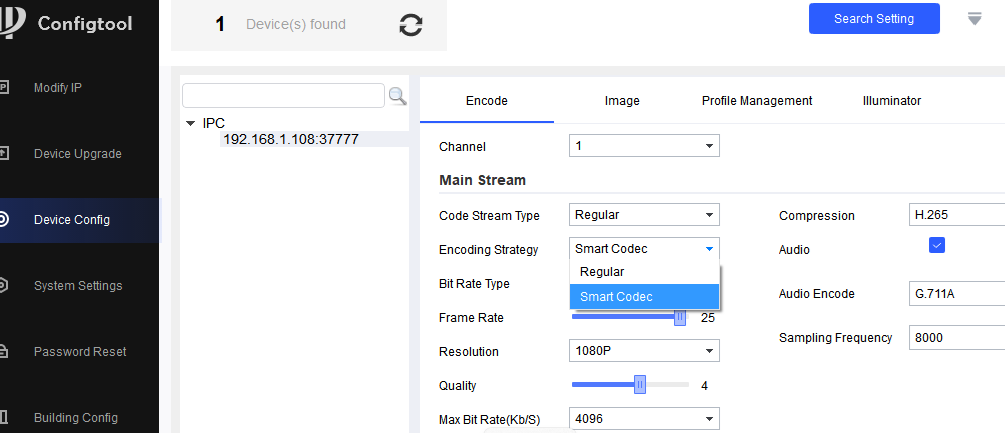
RegularとSmart Codecの切り替えを表示。単に解像度を選ぶだけでなく、被写体の変化と保存容量に合わせた圧縮戦略を設定できます。Regular and Smart Codec are selectable. Compression strategy can be considered separately from resolution for changing scenes and storage budgets.
CODEC STRATEGY
Regular/Motion/Alarmは、同じメインストリームに用意された録画条件別の符号化設定です。3本の映像を同時配信する意味ではありません。Regular, Motion and Alarm are condition-based encoding settings for the same main stream—not three simultaneous video streams.
音声も有効:G.711A/8 kHzAudio enabled: G.711A / 8 kHz
Motion/Alarmの保存値は、この写真からは読み取れません。The saved Motion and Alarm values are not shown in this image.
平常時は、現場に応じて例えば1~5 fpsと控えめなビットレートに設定。動きの少ない時間帯の通信量と保存容量を抑え、録画日数を確保します。For quiet periods, a site may use, for example, 1–5 fps and a lower bitrate budget to reduce traffic and storage use and extend retention.
動体検知に連動する設定では、フレームレートを上げ、映像に見合うビットレートを割り当てます。人の通過など動きの連続性を捉え、圧縮による細部のつぶれを抑えます。With motion-triggered recording configured, higher frame rate captures the sequence of movement, such as a person passing through; a suitable bitrate helps preserve detail against compression artifacts.
対応する警報イベントでは、重要場面向けのフレームレートとビットレートを別に設計できます。警報前の映像を残すには、対応する録画機の事前録画設定も確認します。For supported alarm events, a separate frame-rate and bitrate plan can prioritize critical footage. To retain footage before a trigger, also check the pre-record setting on a compatible recorder.
fpsは動きの記録間隔、ビットレートは画質に使えるデータ量です。fpsだけを下げても、固定ビットレートのままでは容量が同じ割合で減るとは限りません。ビットレートを上げても撮像素子の解像度は増えず、低fpsで撮らなかった警報前の動きも後から復元できません。出入口など常時動きの多い場所では、平常時も十分なfpsを確保します。Frame rate controls how often motion is sampled; bitrate controls the data available to encode each scene. Lowering fps alone may not save proportionate space under constant bitrate. Raising bitrate does not increase native resolution, and frames missed before a trigger cannot be recovered. Keep an adequate routine frame rate at busy entrances.
実運用では、動体・警報検知、録画スケジュール、イベント連動、対応するカメラ/録画機の設定を合わせ、実際の録画ファイルで切替と画質を確認します。この画面は設定項目を示すもので、自動切替の動作結果ではありません。In deployment, align motion/alarm detection, recording schedule, event linkage and supported camera/recorder settings, then verify the recorded clips. This screen shows available controls, not proof that automatic switching has already occurred.
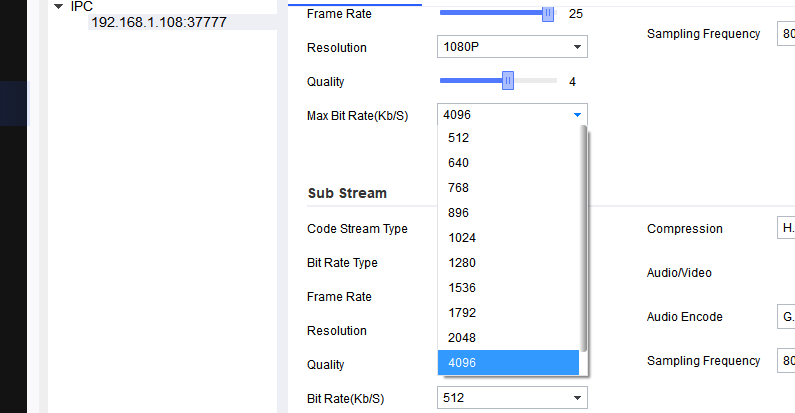
表示された最大ビットレート候補は512–4096 Kb/s。映像品質と通信量・録画日数の釣り合いを数値で調整します。The displayed maximum-bitrate menu spans 512–4096 Kb/s, making the quality, traffic and retention trade-off explicit.
BANDWIDTH BUDGET
メイン側の帯域選択と、その下に続くサブストリームの項目が一画面に並びます。録画と閲覧に同じ重さの映像を強制しません。Main-stream bitrate choices appear above independent sub-stream fields. Recording and preview do not have to carry identical video loads.
DUAL STREAM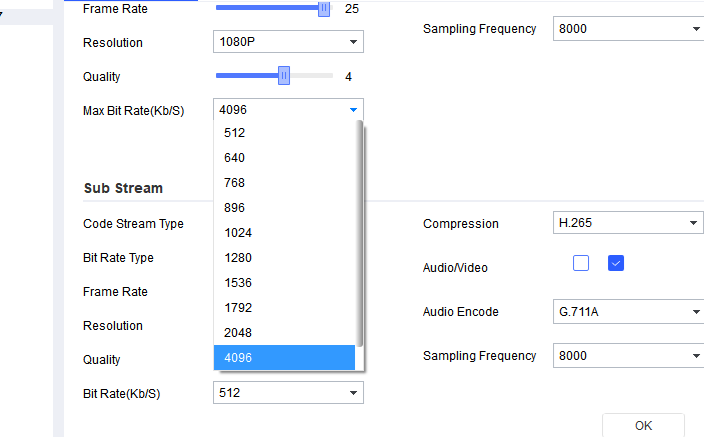
サブストリームにもH.265、Audio/Video、G.711Aの項目。複数クライアントへ送る情報量を用途別に整理できます。The sub stream exposes H.265, Audio/Video and G.711A settings, allowing different client paths to receive an appropriate payload.
SUB-STREAM AUDIO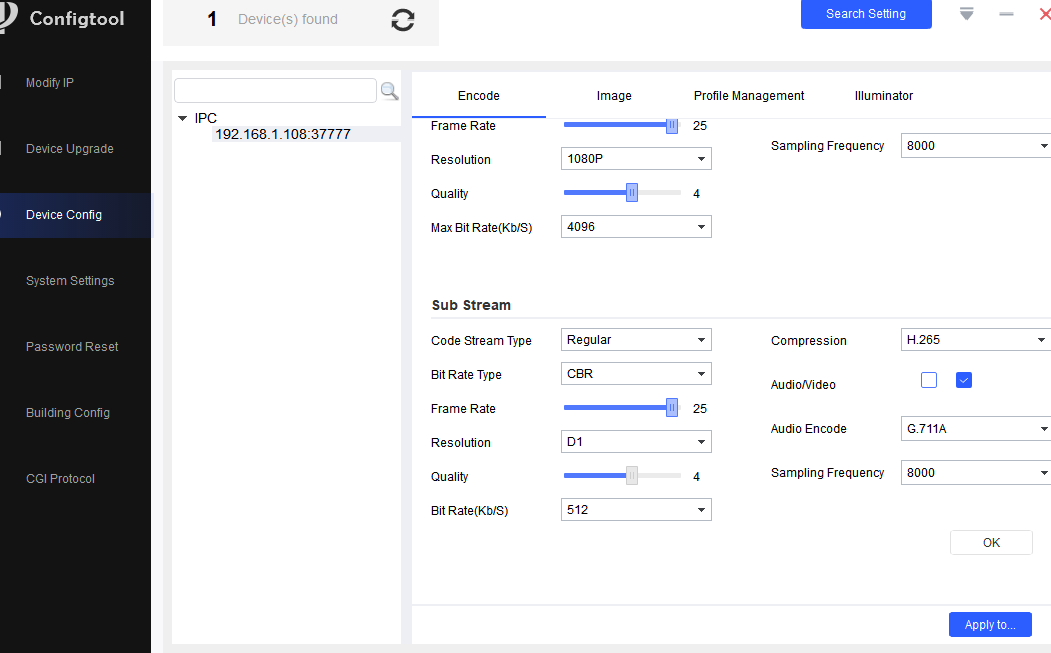
サブストリームでD1、25 fps、CBR、512 Kb/sの設定例。画素数より動きの連続性を優先する遠隔監視設計に使えます。A D1, 25 fps, CBR, 512 Kb/s sub-stream example favors temporal continuity in a lighter remote-viewing feed.
REMOTE VIEWING
赤枠で副系統の25 fpsを明示。メイン側を維持しながら、補助映像の動きの滑らかさを設定できます。The marked control shows 25 fps on the sub stream, independently of the main recording path.
TEMPORAL DETAIL
同じ設定項目を1 fpsへ変更した例。低変化の場所では配信負荷と保存量を優先する別設計が可能です。The same control at 1 fps illustrates a low-load design for slowly changing scenes and constrained links.
LOW-BANDWIDTH MODE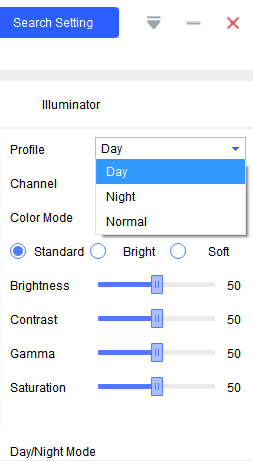
Day/Night/NormalとStandard/Bright/Soft。明るさ、コントラスト、ガンマ、彩度まで個別に調整し、現場の見え方を追い込めます。Day/Night/Normal and Standard/Bright/Soft sit alongside brightness, contrast, gamma and saturation controls for site-specific image tuning.
SCENE TUNING
映像に矩形の関心領域を描き、領域の画質を1–6で設定する画面。出入口や対象エリアを軸に映像資源を配分できます。A rectangular region of interest and quality levels 1–6 let the operator focus visual resources on an entrance or critical area.
REGION OF INTEREST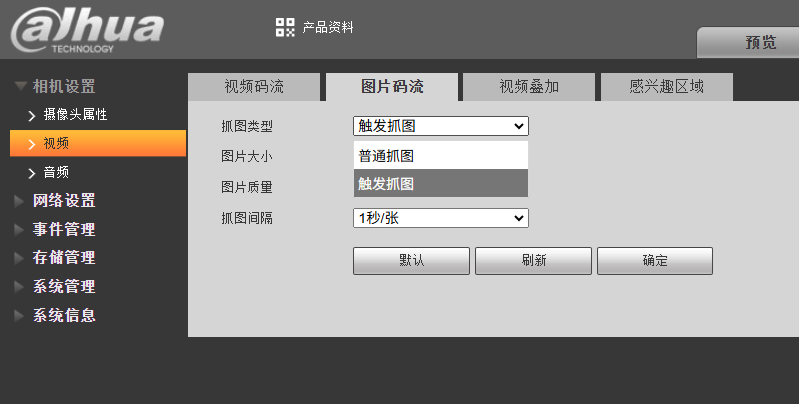
静止画には通常撮影とイベント連動撮影の選択肢。1秒/枚の間隔表示もあり、必要な瞬間を別形式の証跡として残せます。Snapshot settings offer regular and event-triggered capture, with a displayed one-second interval option for still-image evidence.
STILL EVIDENCE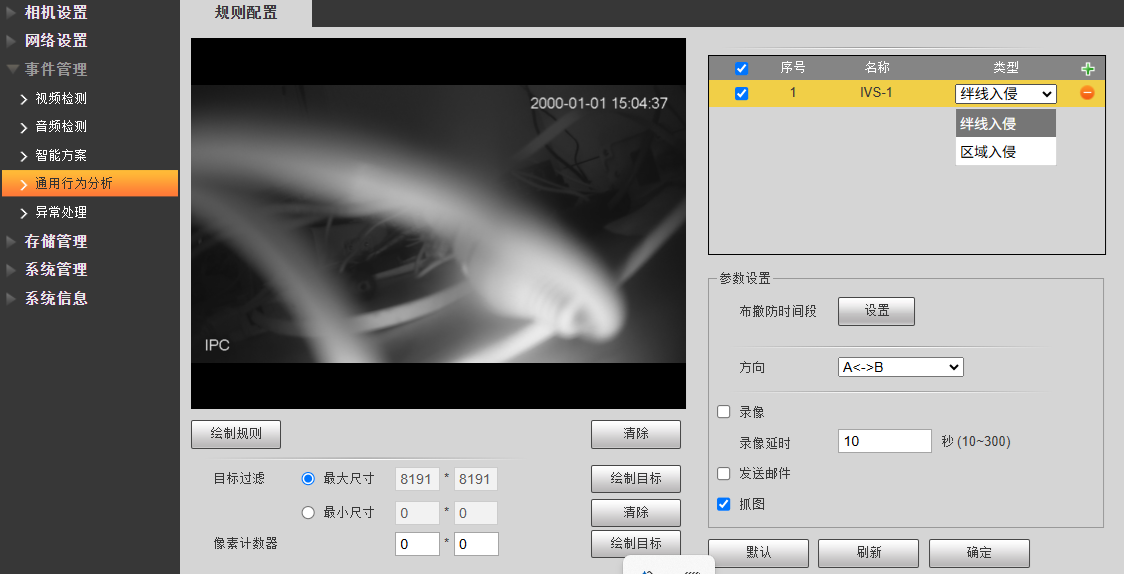
ルール種類、方向、防抖時間、対象サイズを指定し、録画・メール・静止画と連動。単純な動体検知より目的を絞った運用ルールを構成できます。Rule type, direction, debounce, object-size filters and linked actions allow more targeted monitoring than undifferentiated motion triggers.
RULE-BASED ANALYTICS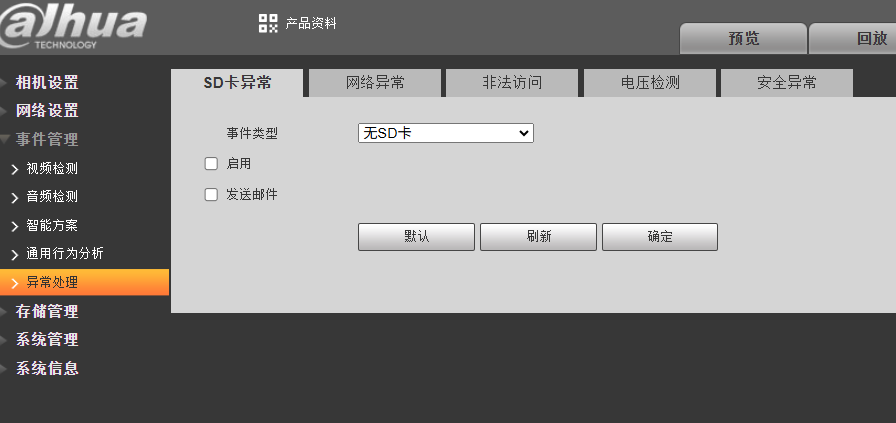
SD、ネットワーク、不正アクセス、電圧、安全異常のタブ。録画が止まる原因を運用イベントとして扱い、通知方法を設計できます。Tabs cover SD, network, illegal access, voltage and security exceptions, turning operational faults into managed events.
SERVICE CONTINUITY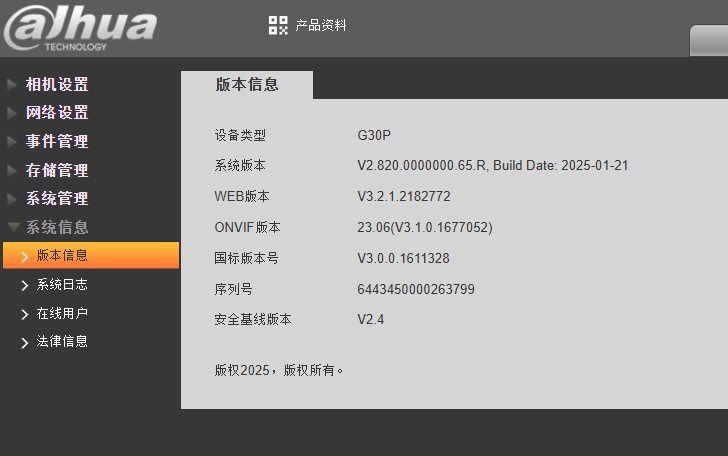
システム情報画面でモデル名、Web版、ONVIF版を確認できます。NVRとの接続設計や保守管理に役立つ情報です。The system panel displays the model name, Web version and ONVIF version for recorder integration and maintenance.
SYSTEM INFORMATION04 / Applications
設定の細かさは、監視対象、通信回線、保存設計を一体で考える際に価値を発揮します。Granular controls matter when the monitored activity, network and retention plan must be designed together.
動きの多い出入口では高めのfps、重要な範囲には関心領域。音声も含めた応対記録とイベント連動を組み合わせます。Use higher fps for active entrances, ROI for critical framing, and video/audio event records for service context.
ライン横断・区域侵入を出入りの監視へ。通信量を抑えた補助映像を併用し、複数地点の同時確認をしやすくします。Apply line and area rules to access paths and use lighter sub streams to view more locations simultaneously.
低fps・ビットレートで回線負荷を抑えつつ、SD・ネットワーク異常を別に監視。映像だけでなくシステムの健全性を運用に入れます。Lower frame rate and bitrate when links are constrained, while tracking storage and network exceptions as operating signals.
05 / Commissioning approach
人・車・入口・設備など、何をどの時間帯に見るかを決めます。Identify people, vehicles, entrances or equipment and the hours that matter.
メイン/サブの解像度、フレームレート、符号化戦略を分けます。Separate main/sub resolution, frame rate and encoding strategy.
ビットレートと保存期間、回線帯域をNVR側の条件と合わせます。Match bitrate and retention to recorder capacity and available network throughput.
検知領域、通知、録画、静止画、異常監視を一つの運用手順へ。Connect detection zones, alerts, recording, snapshots and health events.
音声を利用する場合は、設置場所の告知、社内規程、適用法令に沿って設定してください。If audio is used, configure it in line with site notices, internal policy and applicable law.